Saturday, July 7, 2012

Remote Desktop Problem from Ubuntu 10.04 to Ubuntu 10.04

OMG I spent a lot of time trying to troubleshoot this simple one, which will keep me haunting for a lot of days to come :-(

The task was very simple at hand,  I had to take remote desktop of System A running Ubuntu10.04 natively with a nvidia graphics card on to SystemB running Ubuntu10.04 inside a VirtualBox.

First step I tried vino the inbuilt remote desktop service.  I turned it on and sure enough it was running however when I attempted to connect to it from SystemB I got just a Black screen over VNC viewer, at times I was able to see the remote system and move my mouse and click on certain thing, it does work on the remote system however the VNC screen locally was not refreshing :-(


Second step I tried removing all Desktop effects in SystemA still no change.

Third Step I installed vnc4server, with apt-get install vnc4server and started VNC server on port 5901 with the command vncserver :1 now I was able to see and interact with just a bash terminal no gnome.  To fix the VNCServer running on port 5901 I had to edit the file in the path ~.vnc/xstartup

The only change is I had to add sh on the exec /etc/X11/xinit/xinitrc and kill the current vncserver session and restart it.

http://www.havetheknowhow.com/Configure-the-server/Install-VNC.html

#!/bin/sh

# Uncomment the following two lines for normal desktop:
unset SESSION_MANAGER
exec sh /etc/X11/xinit/xinitrc


[ -x /etc/vnc/xstartup ] && exec /etc/vnc/xstartup
[ -r $HOME/.Xresources ] && xrdb $HOME/.Xresources
xsetroot -solid grey
vncconfig -iconic &
x-terminal-emulator -geometry 1280x1024+10+10 -ls -title "$VNCDESKTOP Desktop" &
Now I was able to see and interact with the desktop of SystemA, However I was not able to see display:0 of SystemA.  When I attempted to start vnc4server on display 0 like vncserver :0 I got an error saying that it is already in use so I jumped to 4th solution.

Fourth Step: I installed X11VNC still I was having the same problem as I had at step 1.

Fifth Step: I clicked on System > Administration > Hardware drivers
I saw a green dot with nvidia properitary driver being installed on systemA and I chose to Remove it and restarted systemA. Viola now my problem got fixed at last.

Tuesday, June 26, 2012

Upload to VT from Ubuntu

Hi I have always wondered as to why on Ubuntu there is no Rightclick on a file and upload to VT, so I modified a python script available on the internet to upload a file on VT and display the results.

I have shows the Python code at the end.

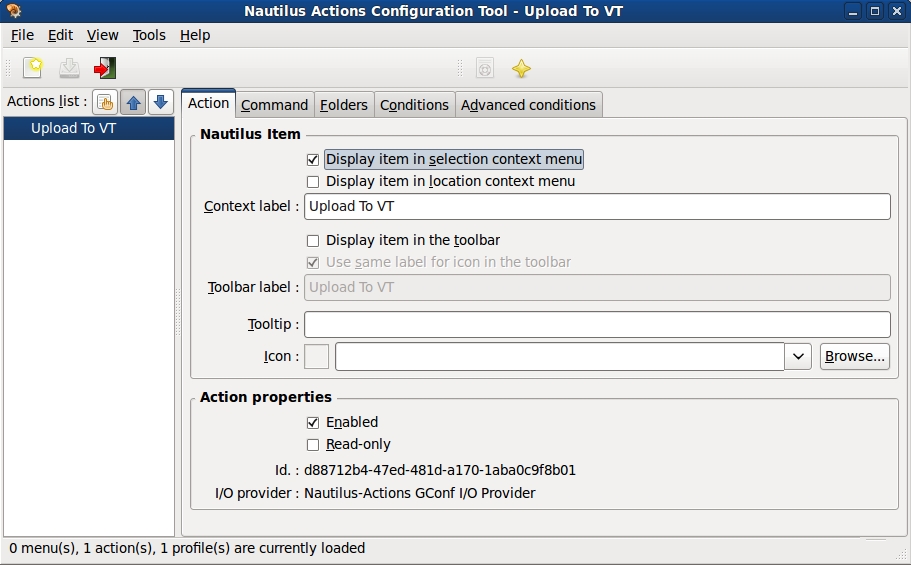
Next to add some actions after right clicking on a file inside nautilus you need nautilus-actions

Next configure nautilus-actions as shown.


The %M is what is going to take our file as input for vtcheck.py.  That is it you have all that you need for Rightclicking on a file and Upload to VT in Ubuntu.


I am not sure if the python script would be shown correctly on blogger, so this screenshot of the code.


cat /usr/bin/vtcheck.py
#!/usr/bin/env python
import hashlib, httplib, mimetypes, os, pprint, simplejson, sys, urlparse, webbrowser, time
DEFAULT_TYPE = 'application/octet-stream'
REPORT_URL = 'https://www.virustotal.com/api/get_file_report.json'
SCAN_URL = 'https://www.virustotal.com/api/scan_file.json'
API_KEY = 'REGISTER_ON_VT_TO_GET_API_KEY'

# The following function is modified from the snippet at:
# http://code.activestate.com/recipes/146306/
def encode_multipart_formdata(fields, files=()):
    """
    fields is a dictionary of name to value for regular form fields.
    files is a sequence of (name, filename, value) elements for data to be
    uploaded as files.
    Return (content_type, body) ready for httplib.HTTP instance
    """
    BOUNDARY = '----------ThIs_Is_tHe_bouNdaRY_$'
    CRLF = '\r\n'
    L = []
    for key, value in fields.items():
        L.append('--' + BOUNDARY)
        L.append('Content-Disposition: form-data; name="%s"' % key)
        L.append('')
        L.append(value)
    for (key, filename, value) in files:
        L.append('--' + BOUNDARY)
        L.append('Content-Disposition: form-data; name="%s"; filename="%s"' %
                 (key, filename))
        content_type = mimetypes.guess_type(filename)[0] or DEFAULT_TYPE
        L.append('Content-Type: %s' % content_type)
        L.append('')
        L.append(value)
    L.append('--' + BOUNDARY + '--')
    L.append('')
    body = CRLF.join(L)
    content_type = 'multipart/form-data; boundary=%s' % BOUNDARY
    return content_type, body

def post_multipart(url, fields, files=()):
    """
    url is the full to send the post request to.
    fields is a dictionary of name to value for regular form fields.
    files is a sequence of (name, filename, value) elements for data to be
    uploaded as files.
    Return body of http response.
    """
    content_type, data = encode_multipart_formdata(fields, files)
    url_parts = urlparse.urlparse(url)
    if url_parts.scheme == 'http':
        h = httplib.HTTPConnection(url_parts.netloc)
    elif url_parts.scheme == 'https':
        h = httplib.HTTPSConnection(url_parts.netloc)
    else:
        raise Exception('Unsupported URL scheme')
    path = urlparse.urlunparse(('', '') + url_parts[2:])
    h.request('POST', path, data, {'content-type':content_type})
    return h.getresponse().read()

def scan_file(filename):
    files = [('file', filename, open(filename, 'rb').read())]
    json = post_multipart(SCAN_URL, {'key':API_KEY}, files)
    return simplejson.loads(json)

def get_report(filename):
    md5sum = hashlib.md5(open(filename, 'rb').read()).hexdigest()
    json = post_multipart(REPORT_URL, {'resource':md5sum, 'key':API_KEY})
    data = simplejson.loads(json)
    if data['result'] != 1:
        print 'Result not found, submitting file.'
        data = scan_file(filename)
        if data['result'] == 1:
        time.sleep(25)
        SAMPLE_URL = "http://www.virustotal.com/file-scan/report.html?id=" + md5sum
        webbrowser.open(SAMPLE_URL)
            print 'Submit successful.'
            print 'Please wait a few minutes and try again to receive report.'
        else:
        time.sleep(25)
        SAMPLE_URL = "http://www.virustotal.com/file-scan/report.html?id=" + md5sum
        webbrowser.open(SAMPLE_URL)
            print 'Submit failed.'
            pprint.pprint(data)
    else:
    SAMPLE_URL = "http://www.virustotal.com/file-scan/report.html?id=" + md5sum
    #print SAMPLE_URL
    webbrowser.open(SAMPLE_URL)
        pprint.pprint(data['report'])


if __name__ == '__main__':
    if len(sys.argv) != 2:
        print 'Usage: %s filename' % sys.argv[0]
        sys.exit(1)

    filename = sys.argv[1]
    if not os.path.isfile(filename):
        print '%s is not a valid file' % filename
        sys.exit(1)

    get_report(filename)
bala@bala-laptop:~$


Here is the python code

Monday, June 25, 2012

6n7Metasploit


5Metasploit


Watermark using Composite, Python and Identify

A few days ago I wanted to watermark few of my images on cmd line and I wrote this blog http://bullet-bala.blogspot.in/2012/06/adding-watermark.html and the trouble which I had was that the Watermark was either very small or very big and got out of the final image. The result of which I created a small python script to extract the Dimension of an image and resize my Watermarker so my water marker always looks okay on the final image.

Initial step create an watermark image and put in inside /usr/local/src/watermark1.jpeg

Next call my python script on command line like so


$cat  watermark.py


#!/usr/bin/python
#Author: Balasubramaniam Natarajan
#Create WaterMark
import subprocess
import sys
import os

#Here I want to get the File to WaterMark
if len(sys.argv) < 2:
print"You need to specify the src image file"
print"For example"
print"watermark.py "
sys.exit()

src = sys.argv[1]
print "Your Input Image File is: ", src

#This command extracts the Dimentions of my Image
CreateImgSize = "identify -format '%wx%h\n' "+src
Size = subprocess.Popen(CreateImgSize, stdout=subprocess.PIPE, stderr=subprocess.PIPE, shell=True)
out, error = Size.communicate()
#This is to trim the additional new line from the above command.
out = out.rstrip('\n')
print "The Dimension of the Image is: ",out, " Pixels"

#This is going to be the name of the output file.
WaterMarkedImage = src+"_output.png"
WaterMarkCmd = "composite -dissolve 10% -gravity south -resize ", out, " /usr/local/src/watermark1.jpeg  ",src, WaterMarkedImage
# The above WaterMarkCmd become tuple which os.system can't accept.
#print type(WaterMarkCmd)
# FinalCmd is a string got from the tuple
FinalCmd = " ".join(WaterMarkCmd)
print "The final command is: ", FinalCmd
os.system(FinalCmd)

#END